Showing posts with label Html. Show all posts

Thursday, 4 May 2017

jQuery Effects - Hide and Show

jQuery Effects - Hide and Show Easy and simple methode

with code

Hide, Show, Toggle, Slide, Fade, and Animate

jQuery hide() and show()

With jQuery, you can hide and show HTML elements with the hide() and show() methods:


 $("#hide").click(function(){
    $("p").hide();
});

$("#show").click(function(){
    $("p").show();
});


Example code for  Hide JQuery script

<html>
<head>
<script src="https://ajax.googleapis.com/ajax/libs/jquery/3.2.1/jquery.min.js"></script>
<script>
$(document).ready(function(){
    $("#hide").click(function(){       // this Jquery code will hide the Text as user click on it
        $("p").hide();
});
    $("#show").click(function(){
        $("p").show();                       
// this Jquery code will hide the Text as user click on it    
 });
});
</script>
</head>
<body>

<p>If you click on the "Hide" button, I will disappear.</p>

<button id="hide">Hide</button>
<button id="show">Show</button></body>
</html>


you can add speed like feature in time J query function
synatax 

$(selector).hide(speed,callback);

$(selector).show(speed,callback); 


Example 

$("button").click(function(){
    $("p").hide(1000);       //  speed is in milliseconds
});


Toggle 

With jQuery, you can toggle between the hide() and show() methods with the toggle() method.

Syntax
$(selector).toggle(speed,callback); 

exmple 
$("button").click(function(){
    $("p").toggle();
});


thanks and njoy  the code 

Saturday, 29 April 2017

PhoneGap Android development Framework

Phone Gap Framework / Desktop Application 

Android development Framework / Tool Phonegap

The PhoneGap Desktop App is the easiest way to get started with PhoneGap. It’s an alternative to the PhoneGap CLI, yet it uses the same libraries under-the-hood.

There’s no complicated installation. You don’t need git, npm, or even node.js. We include all of the important parts for you, so that you can focus on creating your next app!

1 ) Download 

Download Phone Gap for Windows
Download Phone Gap for Mac      

2 )     Extract the Zip file and Install the Application on your system

3 )     Use  Application On your system any time

How to use it

Total installation of PhoneGap and environment
Youtube video

 Open the application


After that 
  1. Click the + on the left-panel.
  2. Select Create new PhoneGap project…
    • Choose a local path to save your project
    • Choose a name for your project, such as “Hello World”
  3. Select Create project.
Phonegap application create project

   Start the Server


    Ip address of your server is mentioned On the green bar
    If the server has not started, click the arrow (>) to the right of your app’s name.

Phonegap application server

 Pair App with PhoneGap Developer App

Phonegap connect with developer app / server
To know about PhoneGap Developer app click here

Get Start Development


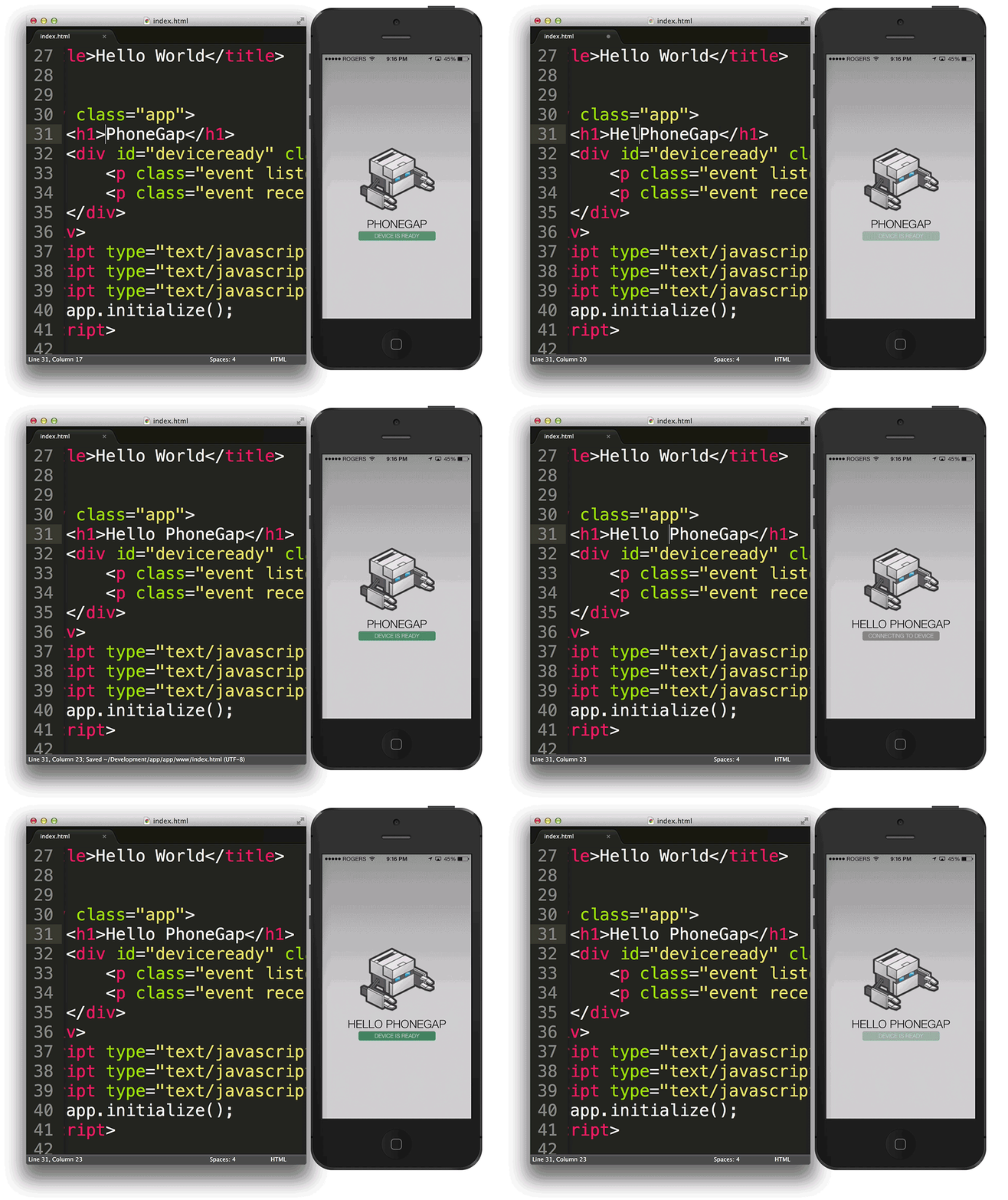
It’s now business as usual. You can now edit and immediately preview your project on a device.
  1. Open www/index.html.
  2. Edit any content.
  3. Save the file.
  4. See the updates appear on your device.      
Phonegap create code final
Enjoy coding ...........
Wait for the next post 
Keep reading


Friday, 28 April 2017

Php form with Sql connectivity

PHP Forms with MYSQL 


 In this section we are going to actually introduce you the PHP development 

In that we are going to make Html form and stores the date which is provided by the user in the Database.


Before that if you dont know how to setup server
(click here)

and finally some development

lets make some form in Html which will

1)
Now for designing a form write the given code in index.php file
and write some Html code as below
1
2
3
4
5
6
7
8
9
10
11
12
13
14
15
16
17
18
19
20
21
22
23
24
25
26
27
28
29
30
31
32
33
<!DOCTYPE html>
<html>
<head>
<style>
label{display:inline-block;width:100px;margin-bottom:10px;}
</style>
<title>Add Employee</title>
</head>
<body>
<form method="post" action="">
<label>First Name</label>
<input type="text" name="first_name" />
<br />
<label>Last Name</label>
<input type="text" name="last_name" />
<br />
<label>Department</label>
<input type="text" name="department" />
<br />
<label>Email</label>
<input type="text" name="email" />
<br />
<input type="submit" value="Add Employee">
</form>
</body>
</html>

As above written Html code please give every <INPUT> tag special  NAME 
cause it is going to help us to connect the our Html code to database via PHP  

Now make another file name as insert.php 
and write below mention code  

in this page in the 
firsr php block we are going to make connection with database
in that check the connection 
after that make sql vaiable and insert the query in that variable 
check the insertion process and if work is done close the connection

<?php
// make connection with database 
$connect=mysqli_connect('localhost','root','password','mydatabase');
 // check connection is working or not
if(mysqli_connect_errno($connect))
{
echo 'Failed to connect';
}
 
// create a variable
$first_name=$_POST['first_name'];
$last_name=$_POST['last_name'];
$department=$_POST['department'];
$email=$_POST['email'];
//Execute the query
mysqli_query($connect"INSERT INTO employees1(first_name,last_name,department,email)
VALUES('$first_name','$last_name','$department','$email')");
// check data in insarted in the database or not 


if(mysqli_affected_rows($connect) > 0){
echo "<p>Employee Added</p>";
echo "<a href="index.html">Go Back</a>";
} else {
echo "Employee NOT Added<br />";
echo mysqli_error ($connect);
}
// echo the values which are inserted 

echo $_POST['first_name'];
echo '<br />';
echo $_POST['email'];
?>

and the sql query for table is 

CREATE TABLE IF NOT EXIST 'employees1'(
'first_name' varchar(20),
'last_name' varchar(20),
'department' varchar(10),
'email' varchar(20),
PRIMARY KEY ('first_name')
)engin=Innodb;


 wait for the Next post till then check previous ones
( Click here for previous Posts about Php )


Contact use for business projects or  college projects
Facebook Gmail  Google +